Production software for machine shops
The job arrives in the morning. The floor reports itself.
Torwio runs the work through your shop: from the customer quote, through the machine schedule, to the finished operation reported at a kiosk. No job cards, no re-typing data, and no phone calls asking what stage it is at.
- System
- Torwio
- Scope
- quotes · schedule · floor · stock
- For
- machine shops
- Deployments
- 1 shop in production
- Demo
- 21 days, free
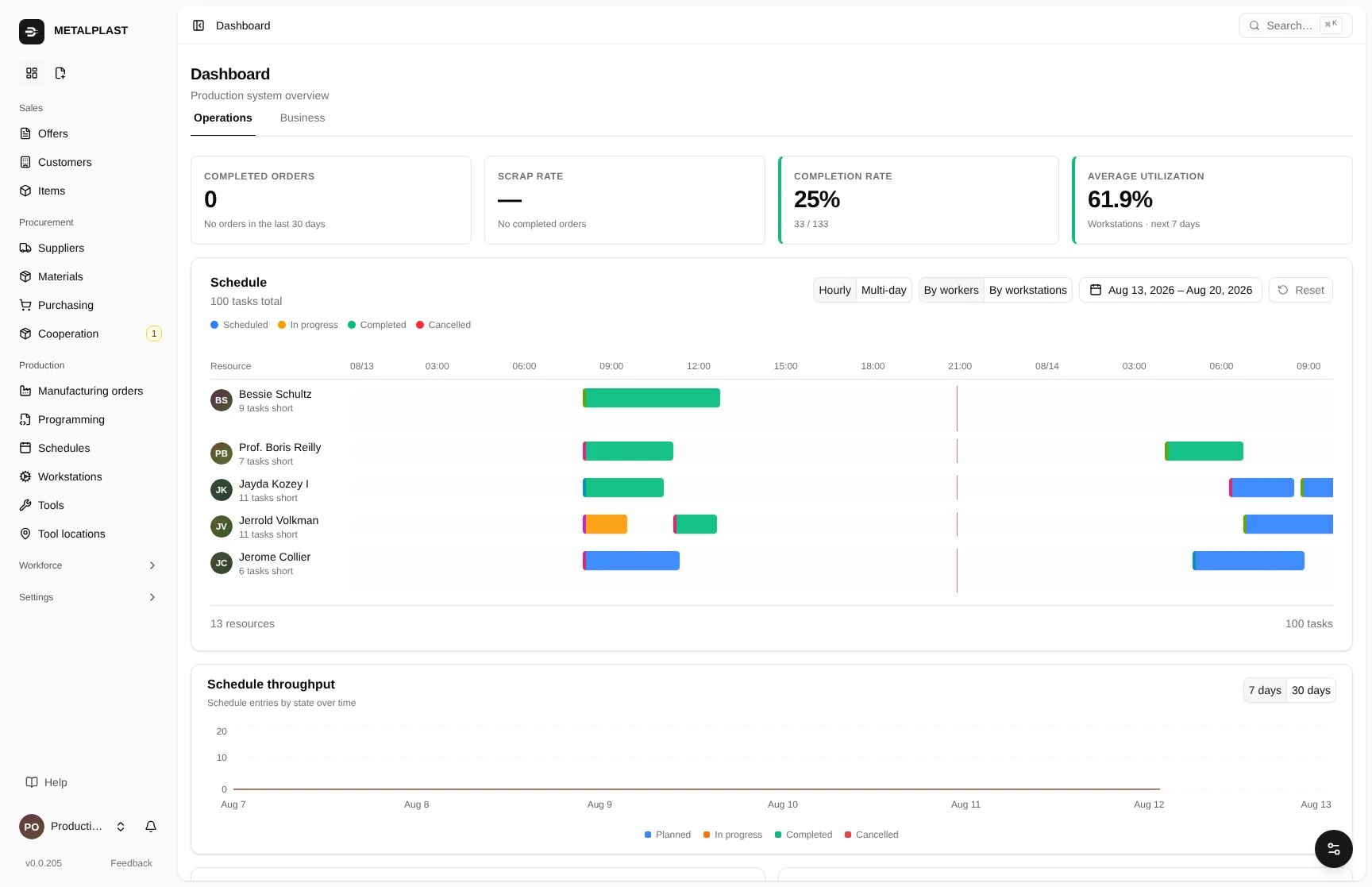
- 01Completion rate calculated from operations reported on the floor, not from declarations.
- 02Workstation load for the days ahead — where there is slack and where there is a queue.
- 03Throughput: how many plan items enter and leave it over time.
One screen
Know what is happening without leaving the office
Job progress does not come from someone’s declaration at the end of the week. It comes from operations that operators reported on the floor the minute they finished them.
It is the same number you give the customer over the phone.
The path of a job
Four steps, one place
Someone at your shop already does every one of these steps. The difference is that in Torwio the result of one step lands straight in the next — instead of on a note, in an email and in three people’s heads.
01
The customer calls
You issue a quote from the part drawing. Prices, discount, lead time. The customer gets a PDF, you get their order number on the line item.
02
The quote is accepted
Acceptance creates a production order. Material is reserved; whatever is missing lands on the list to buy.
03
The plan builds itself
The schedule places operations on workstations, accounting for setup times and tool availability. You can see where staffing will run short.
04
The floor reports itself
The operator scans a badge, presses BEGIN, and scans again when done. Quantities and scrap are entered by the person who made them.
What is inside
Four areas that hold a shop together
Each one described separately, with screenshots from the running system.
01
Production scheduling
A schedule that calculates setup times and sees when a workstation has nobody on it.
READ →
02
Shop-floor kiosk
The operator scans a badge and presses one button. The office sees it immediately.
READ →
03
Quoting and pricing
From the customer’s phone call to work on the floor, with a PDF and a discount on the way.
READ →
04
Inventory and purchasing
Material reserved against a specific order, purchasing handled through one path.
READ →
Who it is for
A machine shop, not a car plant
Torwio grew out of work in a real shop, not from a requirements list invented around a table.
It fits if
- You make parts to order, in short and medium runs.
- You have anywhere from a handful to a few dozen workstations and operators per shift.
- A job passes through several operations on different machines.
- You buy material against a specific job and need to know it will be enough.
- You agree lead times over the phone and want to stop guessing.
It does not fit if
- You make one product in a long run and line takt is what matters.
- You need full accounting — Torwio does not replace it.
- You are looking for software that deploys itself, with nobody’s time involved.
We say this up front, because it would surface in the first week anyway.
The job card
The whole history of a part in one place
Which steps are done, who worked on them, how many pieces went to scrap, whether material will last. Plus a printout of the process route straight from the screen — the same one that travels with the part to the floor.
How the plan is built →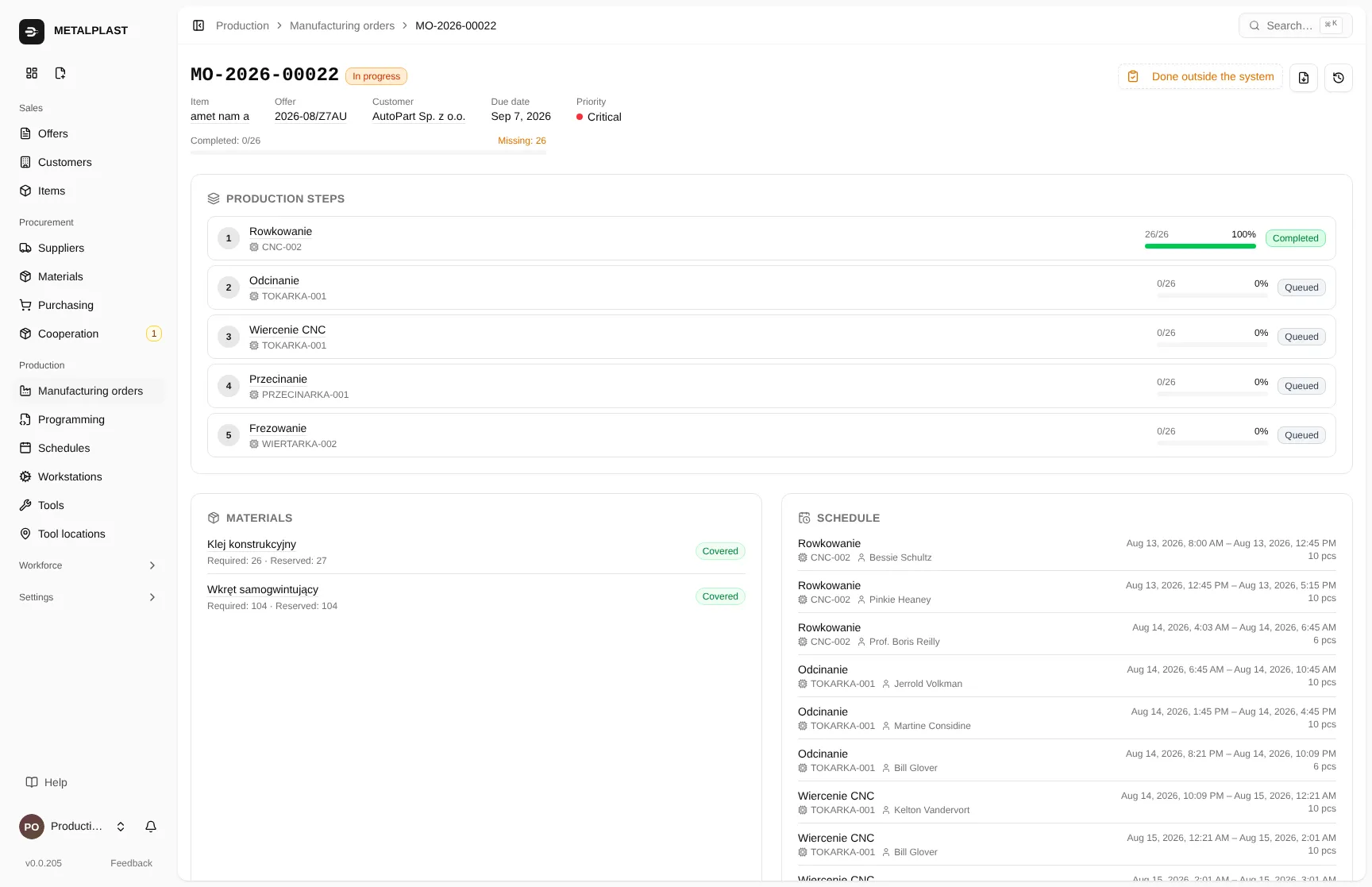
- 01Process steps with state and progress: queued, running, completed.
- 02Missing material flagged before it stops the work.
- 03Who did the step and when — you know who to ask.
Where we are today
Honest about the stage we are at
1
machine shop runs production on Torwio. We are not pretending there are fifty.
0
job cards to re-type. Operators report work where they did it.
21
days to evaluate the system on your own parts before you pay anything.
Torwio is a young product and that is its biggest weakness. Its strength is that it grows week by week alongside the shop running on it — and a need you raise does not join a two-year queue.
Deployments
Where Torwio already runs
“We stopped printing daily schedules. The badge is printed once and the rest happens on the floor.”
Yours could be the second deployment
The second customer gets more of our time than the tenth — and real influence over what gets built in the coming months.
Get a demoQuestions
The questions that come up anyway
01
What is Torwio?
Torwio is real-time production management software for machine shops. Progress does not come from sensors or end-of-week claims — the operator reports a finished operation at the kiosk and the office sees it the same second. The system covers customer quotes, production orders, workstation scheduling, and materials and purchasing.
02
Is Torwio an MES system?
For what a small shop needs — yes: real-time work reporting from the shop floor, workstation scheduling, enforced operation order. Progress is reported by operators at the kiosk, not by machine sensors. On top of that, Torwio covers what a classic MES does not: quotes, production orders and inventory in one system.
03
Does the operator need computer skills?
No. There is a kiosk on the floor — a tablet with a scanner. The operator holds their badge to the scanner and presses one large button. No login, no password, no keyboard. They scan twice: when starting and when finishing a task.
04
Can the system be evaluated before buying?
Yes. We set up a separate Torwio instance for 21 days where you can enter your own parts and orders. The trial is one per company.
Demo
See it on your own parts
We set up a separate Torwio instance for you for 21 days. You enter your own orders, click around and check whether it fits your shop. We help you get started.